
 Krist S
People are trying to use their phones less by changing how they interact with them, not by quitting them entirely. Instead of strict digital detoxes, the most effective approach is reducing automatic phone use through smaller changes like filtering notifications, using grayscale mode, setting phone schedules, and relying on smartwatches to reduce constant unlocking and checking behavior.
Phones didn’t slowly become distracting by accident. They were built to interrupt you. That’s the uncomfortable part most people skip over. Every tap, vibration, and badge is designed to pull attention away from whatever you were doing and pull you into something else.
So when people say they’re trying to “use their phone less,” that’s not really the full story. Most of the time, they’re trying to stop the automatic pull. The reflex. The habit of unlocking without thinking, checking without intention, and losing time without noticing it happens.
And that’s where the real shift is happening. Not in quitting phones. Not in discipline challenges. But in breaking the chain between notification → reaction → scrolling.
What actually works is surprisingly small. But it changes behavior in a way that strict rules usually don’t.

Phone Fatigue Isn’t About Screen Time. It’s About Losing Control
The problem isn’t that people spend time on their phones. It’s that they don’t always choose when it happens.
It usually starts like this:
- a vibration mid-task
- a quick unlock to check “one thing.”
- An app opens automatically
- Ten minutes disappear without intention
And the key issue is not the time itself. It’s the constant interruption of thought.
Even when nothing urgent is happening, the phone creates a sense of “something might be happening.” That alone is enough to pull attention away repeatedly throughout the day.
So the goal isn’t less usage. It has fewer forced interruptions.
That distinction matters more than it sounds.
The Most Effective Change: Cutting Notification Access, Not Just Noise
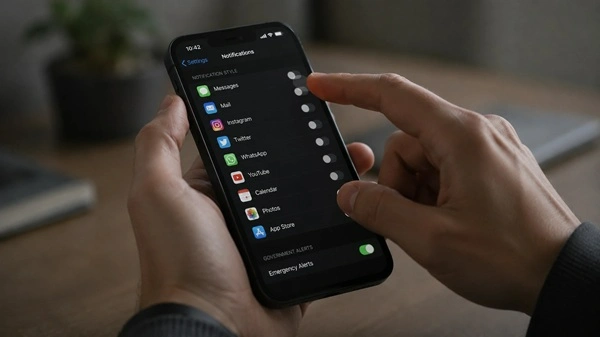
The biggest shift people make is not deleting apps or trying to “be disciplined.” It’s aggressively limiting what is even allowed to interrupt them.
Most setups end up extremely selective:
- direct messages from real contacts
- calls from known numbers
- calendar reminders
- banking or security alerts
- essential work tools
Everything else gets delayed, grouped, or fully silenced.
What changes here isn’t just volume. It’s behavior structure.
The phone stops acting like a constant interruption system and starts behaving like something you check on purpose.
That shift alone reduces a large portion of accidental usage, especially during work or downtime.
Grayscale Works Because It Breaks the Reward Loop
Turning a phone screen to grayscale sounds almost too simple to matter. But it changes how the phone feels.
Without color, apps lose part of their pull. No bright red badges. No visual urgency cues. No high-contrast feeds are designed to grab attention instantly.
What’s left still works, but it feels less rewarding to enter.
This is important: grayscale doesn’t block anything. It just reduces stimulation.
That leads to subtle changes:
- fewer impulse opens
- shorter scroll sessions
- less “I didn’t mean to open this app” behavior
It works best because it removes reward signals, not access.
But it’s not perfect. Some people revert because it also makes certain tasks less visually clear, especially maps, media, or design-heavy apps. So it’s often used selectively rather than permanently.

Smartwatches Reduce the Need to Unlock the Phone First
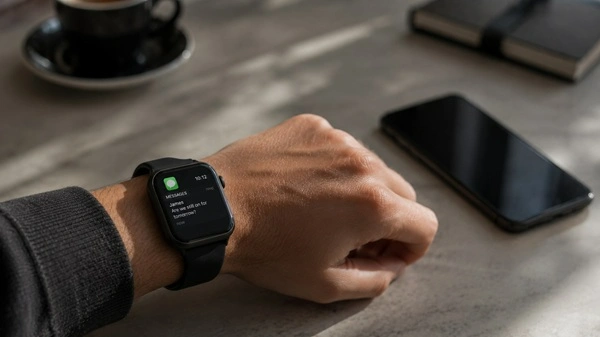
Wearables like the Apple Watch Series and Samsung Galaxy Watch are becoming less about fitness and more about interruption filtering.
This is one reason smartwatches are becoming more relevant for people trying to reduce phone dependence. The buying decision itself has become more complicated, especially with different ecosystems and feature gaps discussed in detail here: Buying a Smartwatch Today Feels Weirdly Complicated.
The key difference is not the notification itself. It’s the entry barrier.
A phone notification usually leads to:
notification → unlock → app → secondary distractions
A smartwatch changes that:
notification → glance → decision → ignore or act
That missing unlock step is more important than most people realize.
Because unlocking a phone is often the real trigger for unintended scrolling, not the notification itself.
So the watch doesn’t reduce information. It reduces escalation.
That’s why it works as a “buffer layer” rather than a replacement device.
Scheduled Phone Use Works Because It Removes Constant Decision-Making
Another approach gaining traction is structured access instead of constant access.
Instead of checking phones all day, people create intentional windows:
- morning check-in
- midday catch-up
- evening review
Outside those windows, the phone is either face down or physically out of reach.
The important part here isn’t the restriction. It’s predictability.
When the brain knows there’s a planned time to check updates, it stops scanning for them constantly.
That reduces low-level anxiety loops like:
“I should probably check my phone just in case.”
And replaces it with:
“I’ll check later, at a specific time.”
That shift removes a surprising amount of background distraction.
App Limits Work When They’re Realistic, Not Extreme
Phones now include built-in screen time tools, and people are actually using them more, but not in the way early “digital detox” advice suggested.
The most effective patterns are moderate, not strict.
Common setups include:
- Limiting short-form video apps during work hours
- blocking social media in the morning
- restricting news intake at night
- capping specific high-engagement apps
What fails is overcorrection.
When limits are too strict, people tend to override them or abandon them completely. That rebound effect often leads to even heavier usage afterward.
So what actually sticks is friction, not force.
Small barriers that slow behavior down slightly tend to outperform hard blocks.
AI Is Quietly Reducing the “Just Checking” Habit
AI-driven systems are starting to change how information actually reaches people’s phones.
Instead of constant, fragmented alerts, more systems are now:
- grouping notifications into clear summaries
- prioritizing only the most relevant updates
- reducing repeated or duplicate interruptions
- delivering scheduled digests instead of real-time noise
- filtering out low-value or passive updates
The point isn’t to make phones smarter for the sake of it. It’s to reduce the number of times people feel the need to open apps without a real reason.
This matters because a lot of phone use doesn’t come from urgency. It comes from uncertainty.
That familiar thought:
“I’ll just check quickly to see what I missed.”
When information is already bundled and simplified, that impulse weakens. There’s less curiosity-driven checking because fewer unknowns are left hanging in the background.
Less ambiguity leads to fewer unnecessary unlocks—and fewer accidental scrolling loops that follow.
Why Full Digital Detox Usually Breaks Down
Complete phone removal sounds appealing in theory, but it rarely holds up in real life.
Not because people lack discipline, but because modern systems depend on smartphones:
- work communication tools
- banking and payments
- navigation and travel
- authentication and security
- bookings and logistics
So when people attempt full removal, they eventually reintroduce the device—and often return to old habits quickly.
That’s why the current shift is more stable. It doesn’t reject phones. It reorganizes how they’re used.
The Real Change Is From Reactive Use to Intentional Use
All the methods that actually work point to the same outcome.
The goal isn’t to reduce phone use overall. It’s less automatic phone use.
That means:
- fewer reflex checks
- fewer interruption loops
- more deliberate engagement
- clearer separation between tasks and downtime
Even small adjustments compound over time.
A phone used intentionally feels like a tool. A phone used reactively feels like noise in the background of everything else.
Same device. Different relationship.
What Actually Works Across Most People
Across different habits and setups, the same patterns keep showing up.
- Notification filtering has the strongest impact on daily interruptions
- Grayscale mode reduces compulsive, impulse-based app opening
- Smartwatches cut down on how often people unlock their phones
- Scheduled phone windows bring structure and reduce constant checking,
- moderate app limits work better long-term than strict bans
- AI summaries reduce the need to open apps “just to see what’s there.”
None of these changes feels dramatic on its own. Most seem almost too simple to matter at first.
But together, they target the real issue: automatic phone use—the kind that happens without intention or awareness.
Why Use Phone Less is the new Meta?
Phones are not going away, and most people don’t want them to. The shift happening now isn’t about removing them from daily life. It’s about reducing how often they take control of attention without permission.
Less reaction. More intention. Fewer interruptions shape the day in the background.
And what’s interesting is how unglamorous the solutions are. No extreme reset. No full detox. Just small structural changes that slowly reduce how often the phone interrupts what’s already happening.
Not less technology.
Just less automatic behavior inside it.
Sources
- Apple Screen Time Guide
- Google Digital Wellbeing
- Pew Research Smartphone Usage Data
- Data.ai Mobile Usage Reports
- Statista Digital Habits Research
FAQ Section
Why are people trying to use their phones less?
People are trying to reduce phone use because constant notifications, short-form content, and app-driven distractions make it harder to focus. Instead of quitting phones, most people are adjusting their habits to regain control over attention and reduce automatic checking behavior.
What actually helps reduce phone screen time?
The most effective methods include limiting notifications, using grayscale mode, setting app time limits, scheduling phone usage windows, and using smartwatches to reduce unnecessary phone unlocking. Small changes tend to work better than strict digital detox rules.
Does grayscale mode reduce phone addiction?
Grayscale mode can reduce compulsive phone use by removing color-based visual triggers that make apps more engaging. While it doesn’t block access, it lowers the “reward effect” of scrolling, which can help reduce impulsive usage for some users.
How do smartwatches help reduce phone usage?
Smartwatches reduce phone usage by acting as a buffer for notifications. Instead of unlocking a phone for every alert, users can glance at their wrist and decide whether something needs attention, which reduces accidental scrolling and app switching.
What is the easiest way to stop checking your phone?
The easiest way is to reduce triggers rather than rely on willpower. Turning off non-essential notifications, moving distracting apps off the home screen, and setting specific times to check your phone can significantly reduce constant checking behavior.
Do app limits really work for reducing screen time?
Yes, but only when used moderately. Strict app bans often fail because they get overridden or ignored. More flexible limits, such as restricting usage during work hours or late at night, tend to be more sustainable and effective long-term.